01
Snap or import a photo
Point your camera at your car or pick a photo. AI vision identifies the car — make, model, bolt pattern and OEM wheel sizes.

Try wheels on your car before you buy: snap a photo, pick from 650+ real aftermarket wheels, and get a photoreal HD wheel swap in about ten seconds.
No sign-up·No credit card·Runs in your browser·~10s per render
Real wheels shown: Forged Metallics FM01 Stratos — our own brand. No mockups.
Drag to compare
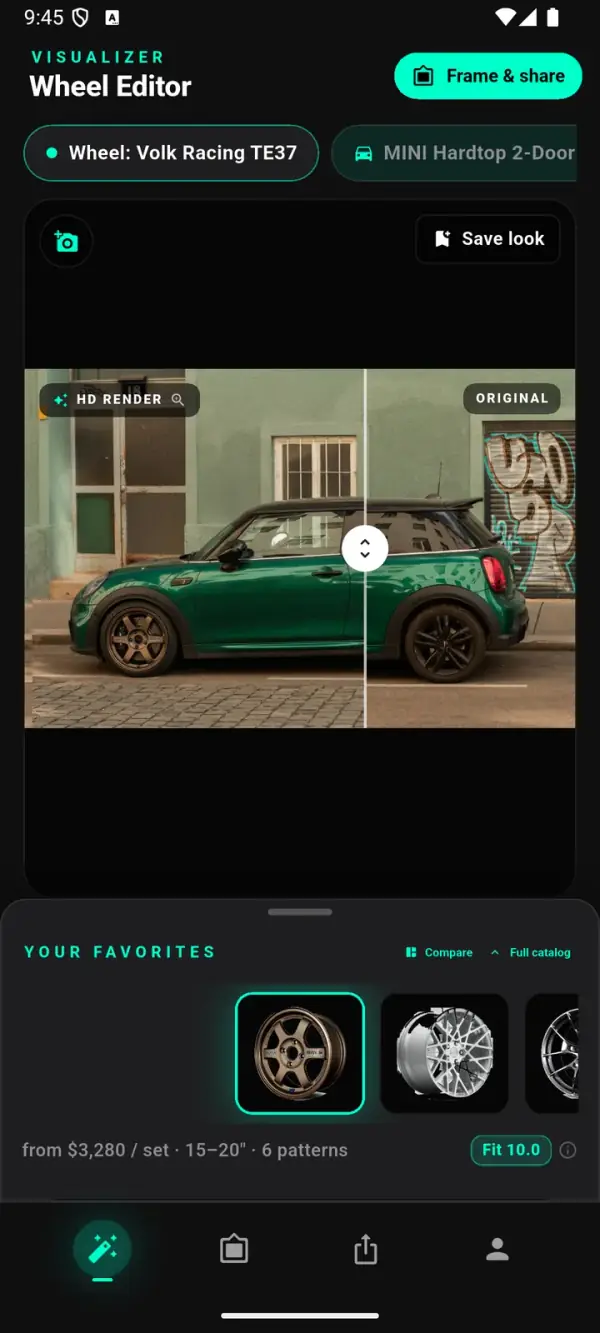
The car from the top of this page, re-rendered by WheelPeek wearing Forged Metallics FM05 Ronin in satin bronze. Left of the line is the original photo — right of it is the actual ten-second render. No retouching, no mockup.


Unretouched output from WheelPeek's live render pipeline (~10 s), verified by the same product-accuracy check the app runs. FM05 Ronin is a Forged Metallics wheel — our own brand.
Real wheels only
Every wheel in WheelPeek is a real product with real manufacturer fitment specs — 650+ wheels from 21 brands, updated server-side so new wheels appear without an app update. The wheels pictured are from our own brand, Forged Metallics.


In the catalog right now — 650+ wheels from 21 brands
Wheel photography: Forged Metallics — our own wheel brand. All wheel brand and vehicle names are trademarks of their respective owners; see the notice in the footer.
How it works
Three steps — snap, pick, render. Test fit any look on your actual car; the editor canvas is the finished render, not a preview.
01
Point your camera at your car or pick a photo. AI vision identifies the car — make, model, bolt pattern and OEM wheel sizes.
02
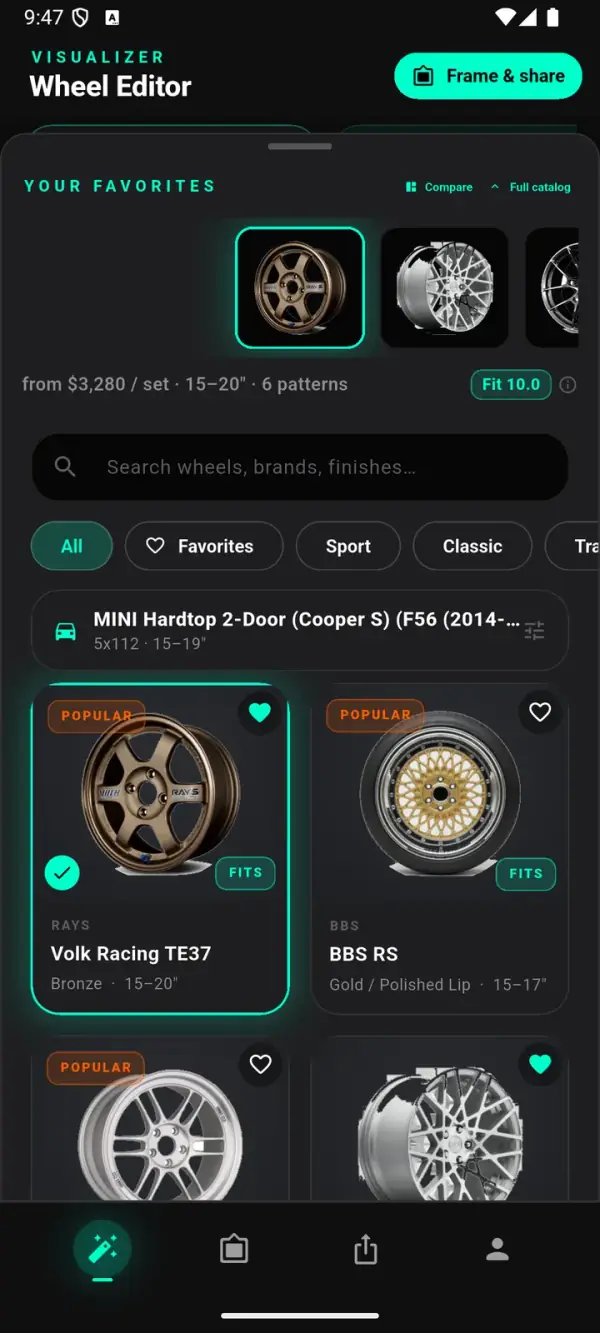
Search the catalog, heart your favorites, and watch FITS badges flag which real wheels suit your car.
03
The canvas becomes the render. Drag the before/after slider, or swipe between favorites — each look slides in already rendered.
Features
Photoreal rendering paired with real fitment data, so a wheel decision comes down to how it looks on your car and whether it actually fits.
The editor canvas is the render — a photorealistic HD image with a built-in before/after slider that lands as an instant comparison against your original wheels.
A deterministic Decision Score rates each wheel on fitment and size match from real bolt-pattern and diameter data, with a brake-clearance label and a custom override for modified cars.
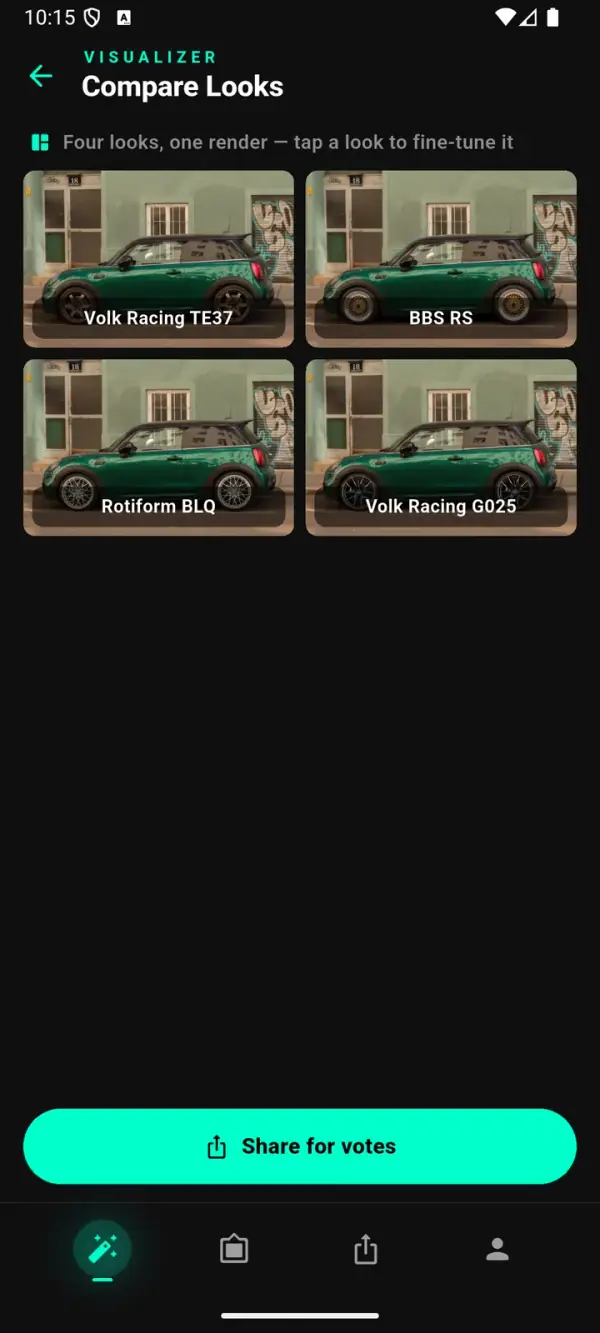
Line up your shortlist on one sheet — 2×2 for a shortlist, 3×3 for a full sweep. Same car, same angle, only the wheels change.
One tap composes a numbered voting card — ①②③④ with names and prices — and opens your phone's share sheet so friends reply with a number.
A growing catalog of real aftermarket wheels, each with real manufacturer specs. It updates server-side, so new wheels appear without an app update.
Save any look and it comes back exactly — same photo, same wheel, same adjustments. No account needed; your garage lives on your device.

Save any try-on and it restores exactly — same photo, wheel and adjustments. Favorites, specs and buy info sit right beside the render.
Compare & decide
WheelPeek turns "which wheels?" into a side-by-side decision on your own car, then a card your friends can vote on.
Tap Compare to line up your favorites automatically, or hand-pick two to four for a single 2×2 render. Run the 3×3 sweep when you want the whole shortlist's verdict.

One tap composes a numbered voting card — ①②③④ with wheel names and prices — and opens your system share sheet. Send it and friends reply with a number to vote.
Fitment
WheelPeek reads your car's bolt pattern and OEM sizes, then scores each wheel against the manufacturer's real specs. Most wheel visualizers stop at the picture — WheelPeek also checks the numbers.
Every wheel shows a FITS badge and a deterministic Decision Score built from real bolt-pattern and diameter data — not a vibe. Modified cars can set a custom fitment override so the scoring matches your build.
Honest note: FITS badges and the Decision Score are estimates from manufacturer specs. Always verify fitment — bolt pattern, offset, width and brake clearance — with the seller or manufacturer before ordering.

Beta
Try the full app in your browser — no install, no sign-up, no credit card. We're tuning WheelPeek with beta feedback.
Paid plans will arrive after beta for heavy use — trying WheelPeek will always stay free. Coming soon to Google Play & the App Store.
FAQ
Photorealistic AI wheel visualizer. Photograph your own car, pick real aftermarket wheels, and it renders them onto your car in HD with real fitment data and a decision score for each wheel. During beta it runs free in your browser; iOS & Android apps are coming.
Yes — during the public beta everything is free to try in your browser: no sign-up, no credit card, nothing to install. Optional paid plans for heavy use will come after beta, but trying WheelPeek stays free.
The editor canvas is a true render: a photorealistic HD image (Google Gemini image models) replaces your photo in place, typically in about ten seconds. Every render is quality-checked against the real product photo; mismatches are auto-rejected and re-rendered. Renders are illustrative and may differ from the real product.
Identifies most cars from a single photo — make, model, bolt pattern and OEM wheel sizes — and auto-detects the wheels with AI vision. Modified cars can set a custom fitment override.
Yes. Every wheel is a real aftermarket product with real manufacturer specs, from a growing catalog of 650+ wheels across 21 brands that updates server-side. The wheels pictured on this page are from Forged Metallics, our own brand.
The catalog currently spans 650+ real wheels from 21 brands — JNC, Vossen, ESR, Enkei, König, F1R, Kansei, Aodhan, Method Race Wheels, Rohana, Titan 7, RAYS / Volk Racing, BBS, Maxxim, Blaque Diamond, Rotiform, fifteen52, American Racing, Yokohama ADVAN, Advanti and Bravado — alongside imagery from our own brand, Forged Metallics. It updates server-side, so new brands appear without an app update. Brand names are shown for identification only.
Three things: real data, speed and price. Every wheel carries real manufacturer fitment specs — bolt patterns, sizes and a Decision Score — so you're not just eyeballing a picture. Renders land in about ten seconds, while many tools take 30 seconds or more. And during the public beta it's free in your browser — no sign-up, no credit card.
Reads your car's bolt pattern and OEM sizes, then scores each wheel against the manufacturer's real bolt-pattern and diameter data — FITS badges plus a Decision Score with a brake-clearance label. Estimates from manufacturer specs; always verify with the seller before ordering.
Uploaded to WheelPeek's render service and processed by AI image providers (Google Gemini and fal.ai) solely to generate your renders. No account required; personal data is not sold. Email wheelpeek@gmail.com for deletion requests.
Yes — embedded visualizer, catalog API and affiliate/product-feed integration: your catalog on your customer's car. See the Business page or email wheelpeek@gmail.com about pilots.
No install and no sign-up. Generate a car and swap real wheels right in your browser.
Coming soon to Google Play & the App Store · get early access by email.
